
Updated October 2026: new screenshots of the AUTO-REMAP file service, a direct link to the EVC page, current WinOLS credit packages and answers to the most common questions.
Connecting Your WinOLS Database to AUTO-REMAP
AUTO-REMAP is a leading expert in ECU tuning and optimization. We offer only unique and carefully developed projects that require special attention and bespoke solutions. Connecting your WinOLS database to ours allows you to seamlessly access professional and exclusive tuning files. Follow these steps to get started:
Quick links: AUTO-REMAP file service (log in / sign up) · EVC Credits Store – link your WinOLS customer ID
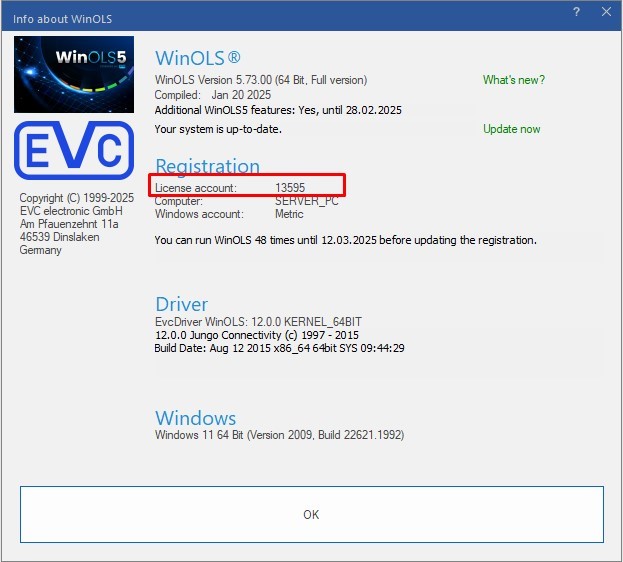
1. Find Your WinOLS Customer Number:
- Open WinOLS and locate your unique customer number (this is your EVC customer ID).
2. Update Your Information in the AUTO-REMAP Account:
- Visit our website AUTO-REMAP, log into your account, or create a new one via this link: https://fs.auto-remap.com/
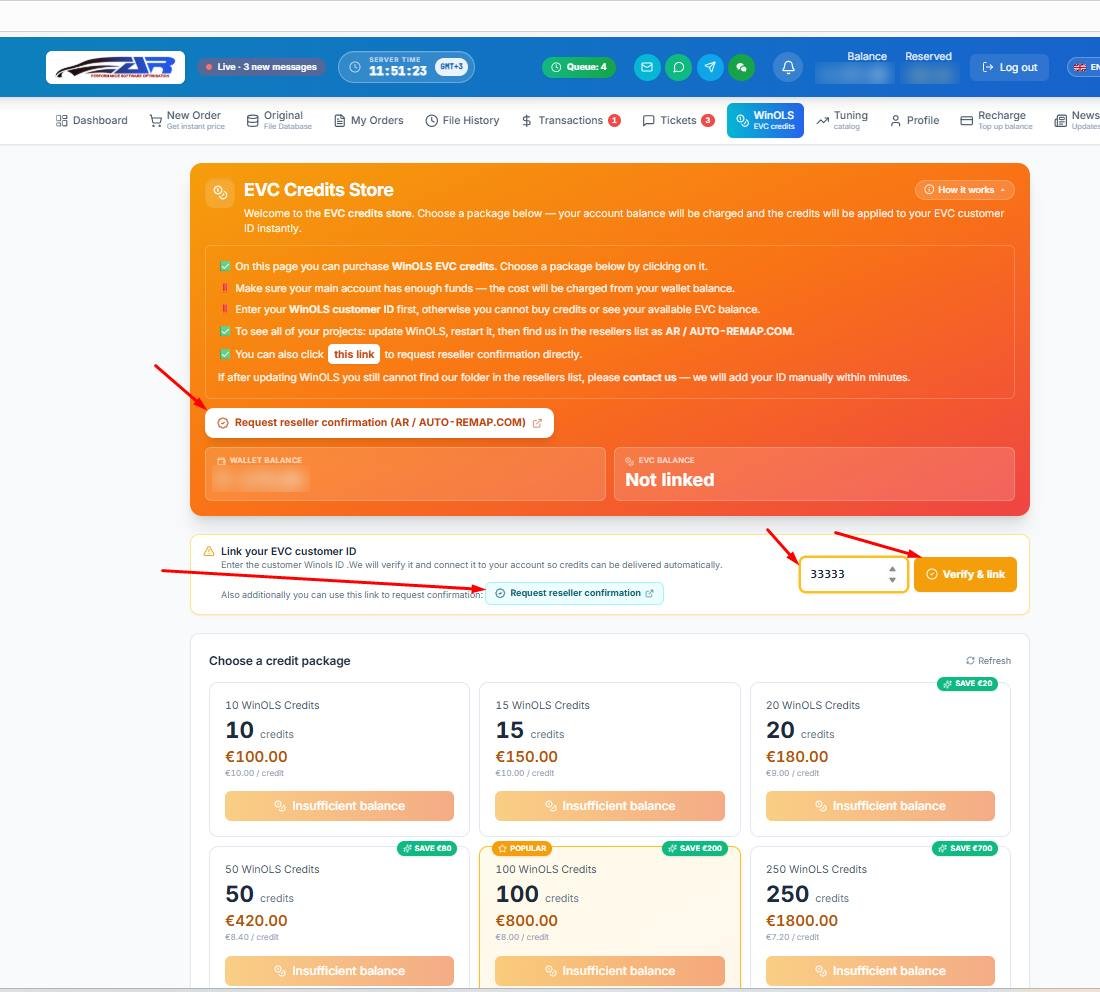
- Open the WinOLS / EVC credits section in the top menu, as shown in the screenshot below, or go there directly: https://fs.auto-remap.com/?page=evc
- In the Link your EVC customer ID box, enter your WinOLS customer number and press Verify & link. We check the ID and connect it to your account, so credits are delivered to your EVC customer ID automatically.
- If you want EVC to confirm AUTO-REMAP as your reseller right away, press Request reseller confirmation (AR / AUTO-REMAP.COM) – the button is at the top of the page and next to the ID field.
3. Update the Customer Path in WinOLS:
- In WinOLS, navigate to the "Miscellaneous" menu and select "Updates and Registration."
- Your WinOLS will automatically receive the new customer path.
4. Verify the New Customer Path:
- In WinOLS, select "AR/AUTO-REMAP” Reseller to view all our available projects.
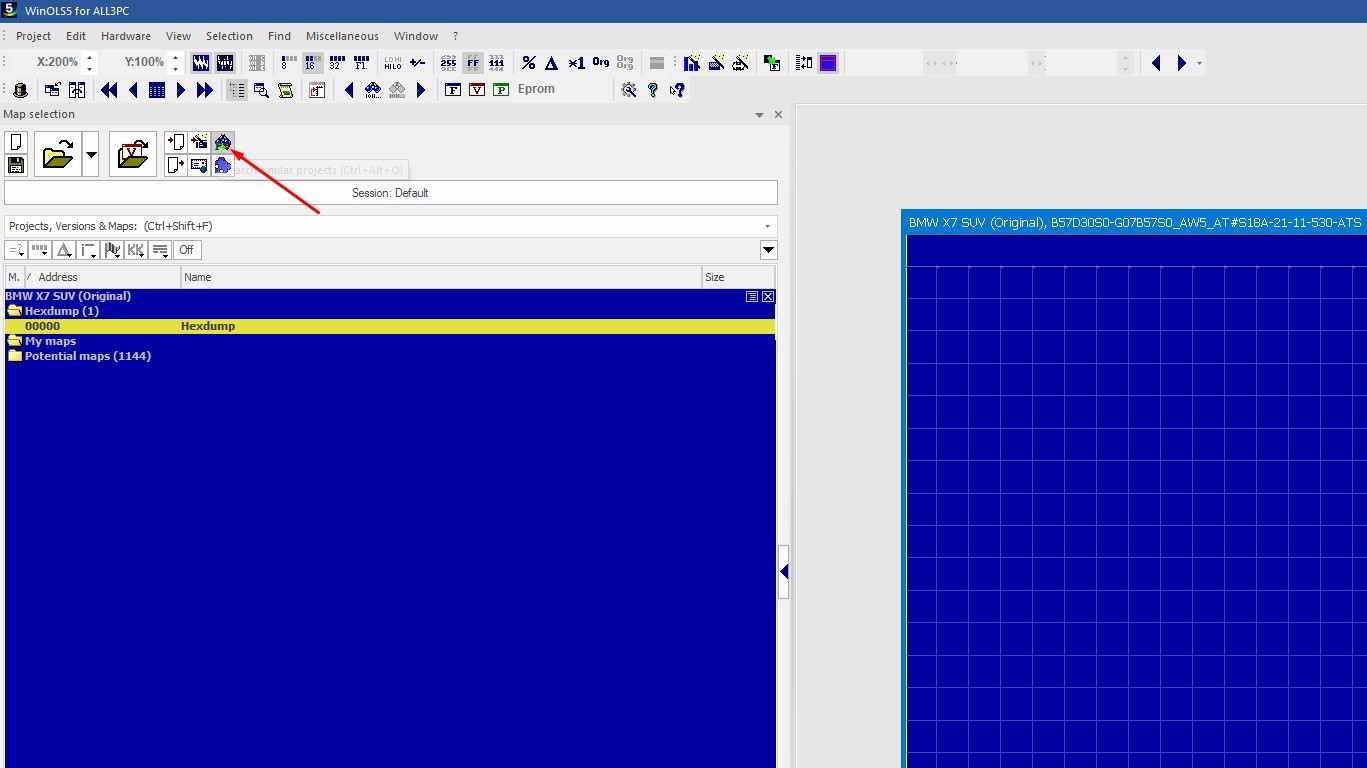
- To search for compatible files, press Ctrl + Alt + O or button and select "Search Similar" to check if a matching project exists in the AUTO-REMAP database.
Cannot Find AR / AUTO-REMAP in the WinOLS Resellers List?
- Make sure your WinOLS customer ID is linked on the EVC page – the EVC balance card should no longer say "Not linked".
- Run "Updates and Registration" in WinOLS again and restart the program.
- Press Request reseller confirmation on the EVC page.
- Still nothing? Contact us with your WinOLS customer number – we add the ID manually within minutes during working hours.
WinOLS (EVC) Credits Packages
Projects from our reseller database are paid with WinOLS EVC credits. Credits are bought in the EVC Credits Store with your AUTO-REMAP account balance (top it up in Recharge) and are applied to your EVC customer ID instantly. The bigger the package, the lower the price per credit:
| Package | Price | Per credit |
|---|---|---|
| 10 WinOLS credits | €100 | €10.00 |
| 15 WinOLS credits | €150 | €10.00 |
| 20 WinOLS credits | €180 | €9.00 |
| 50 WinOLS credits | €420 | €8.40 |
| 100 WinOLS credits | €800 | €8.00 |
| 250 WinOLS credits | €1800 | €7.20 |
Prices as of October 2026; the live prices are always on the EVC Credits Store page.
What is Available in the AUTO-REMAP Database:
We provide access to exclusive materials, including:
- Unique tuning files.
- Personalized map packs.
- Specialized solutions for AdBlue and DPF.
- Damos files (custom DAMOS for your exact ECU software).
- Solutions requiring detailed analysis and custom approaches.
All projects in our database undergo strict quality control and meet the highest standards in ECU tuning.
Before buying, you can check what we cover: the ECU solutions database (software versions we already have a solution for), the chip tuning catalog with Stage 1 / Stage 2 figures per engine, and the original files database.
How to Download a Project:
To purchase and download a project, you can use OLS credits available through your account on AUTO-REMAP.
Why Choose AUTO-REMAP?
- Expertise: We provide only carefully crafted solutions, avoiding mass production of generic files.
- Tailored Approach: Each project is developed with attention to the client’s specific needs and requirements.
- Ease of Use: Intuitive interface and seamless integration with WinOLS.
FAQ: WinOLS Reseller AR / AUTO-REMAP
Where do I enter my WinOLS customer number?
On the AUTO-REMAP file service, page WinOLS / EVC credits: enter the number in "Link your EVC customer ID" and press "Verify & link".
Is the WinOLS customer number the same as the EVC customer ID?
Yes. It is the number shown in WinOLS (see step 1). Without it you cannot buy credits or see your EVC balance.
How do I buy WinOLS credits from AUTO-REMAP?
Top up your AUTO-REMAP balance, open the EVC Credits Store, choose a package (10 to 250 credits) and click it. The amount is charged from your wallet and the credits go to your EVC customer ID instantly.
I updated WinOLS but AR / AUTO-REMAP is not in the resellers list. What now?
Check that your ID is linked, press "Request reseller confirmation", restart WinOLS. If the folder still does not appear, contact us – we add your ID manually within minutes.
Can I check if a file for my ECU exists before buying?
Yes. In WinOLS use "Search Similar" (Ctrl + Alt + O) in the AR / AUTO-REMAP reseller database, or look up your ECU and software version in our solutions database.
If you have any questions, our team is always ready to assist. Contact us through AUTO-REMAP for more information.
AUTO-REMAP – Innovative Solutions for Your Success!
Fileservice: fs.auto-remap.com
Tel: +34 692033056 | e-mail: info@auto-remap.com | 


UAB "Autoremapas" 304838413 V. Nagevičiaus g. 3, LT-08237 Vilnius
ENCORE-PERFORMANCE LTD 85 Great Portland Street, First Floor, London, United Kingdom, W1W 7LT